
This is the English introduction to the QGIS WFS 2.0 plugin which is currently in development (zum Artikel in deutscher Sprache).
Features:
- Supports Web Feature Service 2.0 (ISO 19142)
- Supports Minimal Spatial Filter (BoundingBox-Filter)
- Supports Stored Queries (INSPIRE pre-defined WFS)
- English User-Interface
- Tested with GeoServer beta 2.2, degree 3.x, GO Publisher WFS
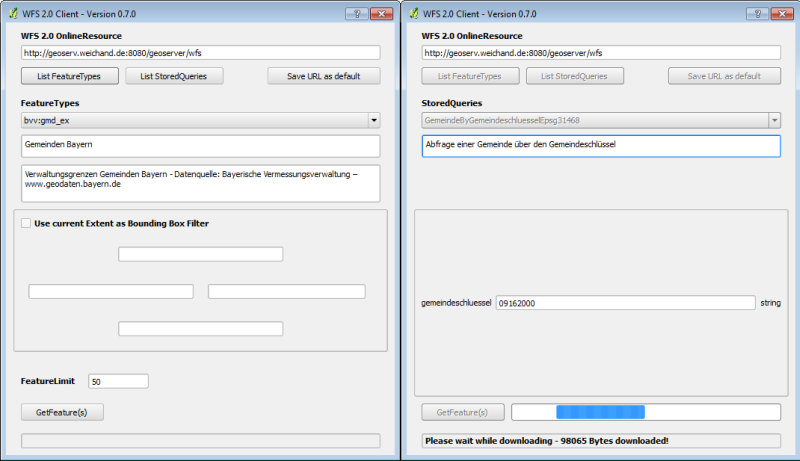
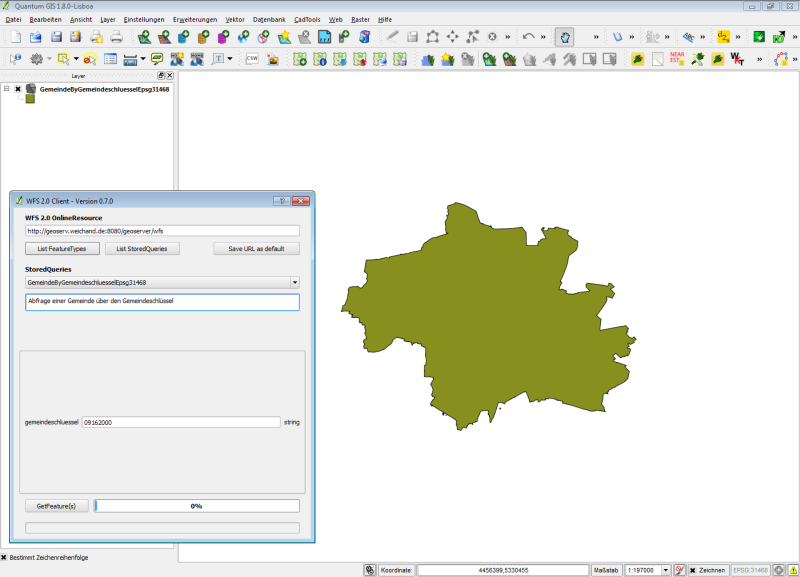
The GML-Data (Version 3.2) which is received by the WFS will be stored as temporary file and loaded as QGIS-Layer.
Installation:
The python plugin is available in the following repository which has to be manually added: http://www.weichand.de/qgis/plugins.xml
Since QGIS 1.8.0 the plugin is available in the default repository.
Notes:
- The plugin is a prototype – still in development
- The plugin is Open Source (GPL)
- Requires QGIS 1.7.4 or higher
- The plugin uses the proxy settings in the QGIS configuration
- The plugin is available in the official QGIS repository
http://plugins.qgis.org/plugins/wfsclient/
The development of the plugin is part of my master’s thesis (beMasterGIS).
Feel free to comment!
Thank you for your effort Jürgen. However I am not able to launch your plugin. It throws the following Python error:
Traceback (most recent call last):File "C:/Users/Roman/.qgis/python/plugins\wfsclient\wfsclient.py", line 67, in run
dlg = WfsClientDialog(self)
File "C:/Users/Roman/.qgis/python/plugins\wfsclient\wfsclientdialog.py", line 56, in __init__
self.ui.lblMessage.setText("CRS is set to EPSG: {0}".format(str(self.parent.iface.mapCanvas().mapRenderer().destinationSrs().epsg())))
AttributeError: 'str' object has no attribute 'format'
I am using QGIS 1.7.2 on Windows 7 64bit
Using QGIS 1.7.4 solves the problem.
Some information about the CRS-handling:
http://osgeo-org.1560.n6.nabble.com/GML-axis-order-handling-using-OGR-Vector-Driver-td4981866.html
Is there any chance you could allow the previous versions of WFS to be read with the plug in as well. The reason I ask is that you have the option to bound the WFS to the current window where the inbuilt wfs client does not.
Sorry – there is no plan to add WFS 1.0.0, WFS 1.1.0 support. Please report your concern to http://hub.qgis.org/projects/quantum-gis (Bugtracker) or http://lists.osgeo.org/listinfo/qgis-developer (Mailing List)
Hi.
I’ve created an INSPIRE compliant WFS 2.0.0 feature download service using ArcGIS 10.1 For INSPIRE and I’m trying to use your WFS 2.0.0 client in QGIS to examine the data.
When I try to examine the GetCapabilities using the WFS 2.0.0 client I’m getting the following error:
„An error has occured while executing Python code:
Traceback (most recent call last):
File „C:/Users/SMW/.qgis//python/plugins\wfsclient\wfsclientdialog.py“, line 144, in getCapabilities
root = ElementTree.fromstring(buf)
File „C:\PROGRA~2\Quantum GIS Lisboa\apps\Python27\lib\xml\etree\ElementTree.py“, line 1282, in XML
parser.feed(text)
File „C:\PROGRA~2\Quantum GIS Lisboa\apps\Python27\lib\xml\etree\ElementTree.py“, line 1624, in feed
self._raiseerror(v)
File „C:\PROGRA~2\Quantum GIS Lisboa\apps\Python27\lib\xml\etree\ElementTree.py“, line 1488, in _raiseerror
raise err
ParseError: syntax error: line 1, column 0
Python version:
2.7.2 (default, Jun 12 2011, 15:08:59) [MSC v.1500 32 bit (Intel)]
QGIS version:
1.8.0-Lisboa Lisboa, f440b60
Python path: [‚C:/PROGRA~2/Quantum GIS Lisboa/apps/qgis/./python‘, ‚C:/Users/SMW/.qgis//python‘, ‚C:/Users/SMW/.qgis//python/plugins‘, ‚C:/PROGRA~2/Quantum GIS Lisboa/apps/qgis/./python/plugins‘, ‚C:\\Windows\\system32\\python27.zip‘, ‚C:\\PROGRA~2\\Quantum GIS Lisboa\\apps\\Python27\\DLLs‘, ‚C:\\PROGRA~2\\Quantum GIS Lisboa\\apps\\Python27\\lib‘, ‚C:\\PROGRA~2\\Quantum GIS Lisboa\\apps\\Python27\\lib\\plat-win‘, ‚C:\\PROGRA~2\\Quantum GIS Lisboa\\apps\\Python27\\lib\\lib-tk‘, ‚C:\\PROGRA~2\\Quantum GIS Lisboa\\apps\\qgis\\bin‘, ‚C:\\PROGRA~2\\Quantum GIS Lisboa\\apps\\Python27‘, ‚C:\\PROGRA~2\\Quantum GIS Lisboa\\apps\\Python27\\lib\\site-packages‘, ‚C:\\PROGRA~2\\Quantum GIS Lisboa\\apps\\Python27\\lib\\site-packages\\PIL‘, ‚C:\\PROGRA~2\\Quantum GIS Lisboa\\apps\\Python27\\lib\\site-packages\\win32‘, ‚C:\\PROGRA~2\\Quantum GIS Lisboa\\apps\\Python27\\lib\\site-packages\\win32\\lib‘, ‚C:\\PROGRA~2\\Quantum GIS Lisboa\\apps\\Python27\\lib\\site-packages\\Pythonwin‘, ‚C:\\PROGRA~2\\Quantum GIS Lisboa\\apps\\Python27\\lib\\site-packages\\wx-2.8-msw-unicode‘, ‚C:\\PROGRA~2\\Quantum GIS Lisboa\\apps\\qgis\\python\\plugins\\fTools\\tools‘]“
Have you come across this error before and can you provide any assistance?
I’m using QGIS 1.8.0-Lisboa on a windows 7 machine.
Many thanks, kind regards, Simon
Can you provide the service url for testing? (Or a capabilities document dump).
Previous comment contained XML GetCapabilities file. I can send via e-mail if required; just let me know your e-mail.
Best wishes, Simon.
Great plugin Jürgen!
I installed it yesterday on my qgis 1.8.0. However, the BBOX filter doesn’t work. I returns the entire data set no matter what I type in.
I hope you’ll find time to fix that.
What Server and SRS did you use?
Hi Jurgen,
Great plugin, well done!
I was wondering if you could add functionality that would allow the user to view the bounding box coordinates of the currently selected „Feature Type“?
Or to go even further, would it be possible to provide a checkbox named „Use maximum feature extent of current Feature Type as Bounding Box Filter“, that way the layer would always load without getting the dreaded „Longitude difference too large: …“ error message.
The reason I ask is, in instances when you add data you are not familiar with, you won’t know what coordinates to specify in the „Bounding Box Filter“.
I hope to hear from you soon.
Keep up the great work.
Sincerely,
Jonathan.
Hi Jonathan,
I will consider the Layer-Extent in one of the next releases. Thanks for that hint.
Kind regards,
Jürgen
Hi Jurgen,
great plugin, my team and I use this to load data from our WFS into QGIS all the time. Do you have any plans for new features or what might go into the next release? I’d be happy to provide some detailed feedback if you are interested,
kind regards,
Alexis Brooker
Hi Alexis,
I will release the 0.9 version later this week. This will be the first version for QGIS 2.0 and a 1:1 port/update from the current 0.8.4 release.
The following update will fix the https support of the plugin.
Feel free to provide your detailed feedback!
Kind regards,
Jürgen
The version 0.9.0 has been released.
Is WFS-T support planned for this plugin?
Thank you!
Michael
Hi Michael,
WFS-T support is NOT planned.
Kind regards,
Jürgen
I’m trying the plugin with a Snowflake Software GoPublisher WFS at http://ogc.bgs.ac.uk/digmap625k_gsml31_gp/wfs which is using urn:ogc:def:crs:EPSG::4326 as the coordinate system. This expects latitude-longitude coordinate order in the BBOX coordinates and it seems Snowflake doesn’t follow the informal GeoServer/Deegree convention of accepting lon-lat order if you specify the SRS using the older EPSG:4326 style. So I can’t do a BBOX filtered query on my service at the moment. (I tried typing the bbox bounding coordinates manually in the filter box without checking the „Use current Extent…“ box but they don’t get sent in the request in this case.) I don’t know what the most correct way of handling this would be but I don’t think we can expect WFS 2 services to all adopt the EPSG:4326 lon-lat convention and with WFS2 we should use lat-lon by default. If QGIS itself doesn’t know about the axis order of particular coordinate systems then maybe we just have to have a dirty hack solution like adding a check box to reverse the order of the coordinates sent to the server so that users can at least manually set the order that works with a particular service?
You’re absolutely right. The reason why I’m using the “informal convention” is the ability of the GDAL/OGR driver for detecting the correct axis order using the official “urn:ogc:def:crs:EPSG::”-Pattern.
GDAL 1.9 (QGIS 1.8) will detect the axis order of geographic coordinates (e.g. urn:ogc:def:crs:EPSG::4326) correctly, but projectes coordinates (e.g. urn:ogc:def:crs:EPSG::31468) will fail. The layer will be loaded with an inverted axis order.
Please check also: http://osgeo-org.1560.x6.nabble.com/gdal-dev-OGR-Driver-GML-axis-order-handling-GDAL-QGIS-td5022836.html
In GDAL 1.10 this issue has been fixed and QGIS 2.0.1 is now using GDAL 1.10 by default (Windows).
http://trac.osgeo.org/gdal/ticket/4329
Will move to the official “urn:ogc:def:crs:EPSG::”-Pattern in one of the next versions.
Thank you very much for your valuable feedback.
Hi,
I’m using the plugin to test MapServer WFS 2.0 implementation. Capabilities load well, but when I go to getFeatures I get back a „Host not found“ message. No request is received on the server side. What happens here ?
thanks
Please check the OnlineResource for the GetFeature-Operation inside the Capabilities.
wfs:WFS_Capabilities/ows:OperationsMetadata/ows:Operation[@name=GetFeature]/ows:DCP/ows:HTTP/ows:Get
Hello.
I was very excited to find a WFS 2.0 client, thank you for making one! However, I have trouble with loading INSPIRE meteorological data.
The data I’m trying to load is described here: http://en.ilmatieteenlaitos.fi/open-data-manual
All goes well until I list stored queries and choose the query I want to use. After this, the plugin asks to input values for parameters to be used by the query. My problem is that the plugin doesn’t allow me to leave any of the parameter values empty, even though many of the parameters are actually optional. When I try to get features all I get is a „Validation error“ telling me that parameter value validation failed.
I can’t post the http-address for the WFS queries because it contains my personal API-key. I could however provide it in a private message.
Is there a way around this error?
Still clarifying if all parameters have to be mandatory or not (by the OGC WFS 2.0 Standard).
Changelog: 0.9.1
Jürgen,
Thanks for the plugin.
Is there a way to access a secure WFS server with a sertificate security (as opposed to unam/password)?
Andre
Hi Andre,
This is not planned yet.
Hi,
When I try to use the WFS 2.0 Client with our GeoServer server, with authentication, the client reports a 401 response. The basic auth header is not present in the http request, despite the ‚requires authentication‘ checkbox having been selected and the username/password being provided. Is there a trick to get the basic auth header included?
Thanks,
Jason Daly
Hi Jurgen
Thanks for the great plugin. I’ve just started using this properly to access data from the Environment Agency in the UK. Here is the getcapabilities request:
http://www.geostore.com/OGC/OGCInterface?SERVICE=WFS&UID=UDATAGOV2011&PASSWORD=datagov2011&INTERFACE=ENVIRONMENTWFS&VERSION=2.0.0&resquest=getcapabilities
I can get data fine at home but when trying to use the plugin in work i get this error (by the way I can access the getcapabilities request via a browser ok at work):
Traceback (most recent call last):
File „C:/Users/TravisM/.qgis2/python/plugins\wfsclient\wfsclientdialog.py“, line 147, in getCapabilities
root = ElementTree.fromstring(buf)
File „Q:\TA4NTKC3.OOJ\VFS\SFT_PR~2\QGISCH~1\apps\Python27\lib\xml\etree\ElementTree.py“, line 1300, in XML
parser.feed(text)
File „Q:\TA4NTKC3.OOJ\VFS\SFT_PR~2\QGISCH~1\apps\Python27\lib\xml\etree\ElementTree.py“, line 1642, in feed
self._raiseerror(v)
File „Q:\TA4NTKC3.OOJ\VFS\SFT_PR~2\QGISCH~1\apps\Python27\lib\xml\etree\ElementTree.py“, line 1506, in _raiseerror
raise err
ParseError: undefined entity : line 87, column 12
Thanks
Matt
Pingback: Update on conformance testing | GeoCat B.V.
Hi Jürgen,
I’trying to import czech cadastral data from server http://services.cuzk.cz/wfs/inspire-cp-wfs.asp?
Get capabilities works perfectly, but cannot import anythling due to following error 🙁
Traceback (most recent call last):
File „C:/Documents and Settings/uzivatel/.qgis2/python/plugins\wfsclient\wfsclientdialog.py“, line 796, in httpRequestFinished
self.load_vector_layer(str(self.outFile.fileName()), self.ui.cmbFeatureType.currentText())
File „C:/Documents and Settings/uzivatel/.qgis2/python/plugins\wfsclient\wfsclientdialog.py“, line 841, in load_vector_layer
logging.debug(„resolveXpathHref “ + resolvexlinkhref)
TypeError: cannot concatenate ’str‘ and ‚NoneType‘ objects
Verze Pythonu:
2.7.4 (default, Apr 6 2013, 19:54:46) [MSC v.1500 32 bit (Intel)]
QGIS verze:
2.8.1-Wien Wien, exported
WFS 2.0 Client plugin v 0.9.3 beta
Any idea? Help will be very appreciated.
Thanks Martin
Hi Martin,
thank you for reporting this issue.
Workaround: Go to the config menu and save an initial config.
Will be fixed in version 0.9.4.
Best regards,
Jürgen
Just released version 0.9.4.
Thank you very much!
Now it works perfectly!!
Martin
Hi,
I still have no luck getting data from
http://services.cuzk.cz/wfs/inspire-cp-wfs.asp?
Using python 2.7.6, qgis 2.8.2 and wfs 2.0 client 0.9.4 (it actually say 0.9.4 beta in the dialog), after getFetaure the error is:
Traceback (most recent call last):
File „/home/tom/.qgis2/python/plugins/wfsclient/wfsclientdialog.py“, line 796, in httpRequestFinished
self.load_vector_layer(str(self.outFile.fileName()), self.ui.cmbFeatureType.currentText())
File „/home/tom/.qgis2/python/plugins/wfsclient/wfsclientdialog.py“, line 860, in load_vector_layer
ogrdatasource = ogrdriver.Open(filename)
AttributeError: ‚NoneType‘ object has no attribute ‚Open‘
I have noticed there is no .gfs file in the temp directory…
Regards, Tom
Hi Jürgen,
I’m also experimenting with the plugin, but I have the impression that it’s not using the QGIS proxy settings. I’m always getting a http 407 (proxy authentication required) error, while I have configured the QGIS proxy settings (httpProxy with username/password). Could you think of a reason it’s not using these? Access to other outside resources like WMS or WFS 1.0.0 are working without problems.
Thanks and cheers, Michael
Hello Jürgen
I have the same Error like Michael some days ago.
My WFS Server is in the same net behind the proxy. So I don’t unterstand why there is a 407.
Hi Jürgen,
I also get this same error when using the plugin from behind my corporate proxy. Normal WMS and simple WFS work OK, but not when I try to use the plugin. Do you have any advice?
Hallo,
first, thanks for this plugin!
I have one question, why in the latest version plugin creates the file except GML also GFS file? For use with http://services.cuzk.cz/wfs/inspire-cp-wfs.asp? I was used to edit the GFS file (I added a line geometry to correct display)
Thank you
Dear Jürgen
I have used your great plugin for years during EU project in order to get European country minerals online as INSPIRE compliant WFS 2.0 services.
Now upgrading to QGIS 3.4, I would like to encourage you to upgrade your plugin to this version as well due to QGIS 3.4 does not resolve complex WFS 2.0 services.
Dear Frands,
thanks for your positive feedback!
A QGIS 3.x upgrade for the WFS 2.0 plugin is currently not planned.
QGIS 3.x has native support for WFS 2.0. You can also try: https://plugins.qgis.org/plugins/gml_application_schema_toolbox/
Kind regards
Juergen